 Keeptly
Guide · Spending
How to track your spending with receipts
Your banking app shows where your money went. Your receipts show what you bought. Put the two together for a month, and the picture of your spending gets much sharper.
Why receipts, not just a statement
A card statement says you spent $86.40 at a grocery store. The receipt shows that part of it was cleaning supplies and part was a gift. Categories built from receipts are closer to what you actually buy, and cash purchases show up too.
A simple method
The U.S. Consumer Financial Protection Bureau suggests four habits:
- Track your spending for a week or a month.
- Group it by category to see how much goes where.
- Set weekly limits for small purchases that add up.
- Compare what you spend with your budget monthly or more often, and change the budget if your spending keeps drifting from it.
Step by step
- Capture every receipt.
On the same day, including the small ones: coffee, parking, snacks. Small purchases are the ones people forget.
- Pick a handful of categories.
For example groceries, dining, transport, home, health and fun. Fewer categories are easier to keep up with.
- Separate business and personal.
If you work for yourself, keep the two apart from the start. It saves an evening of sorting later.
- Look once a week.
Five minutes is enough: what changed, what surprised you, which limit you went over.
- Review the month.
Compare the total with last month and with your plan. Choose one thing to change next month.
Don't forget installments
Payments split over several months are easy to lose track of. For each one, write down the monthly amount and how many payments are left. Then you know not only what you spend this month, but what you still owe after it.
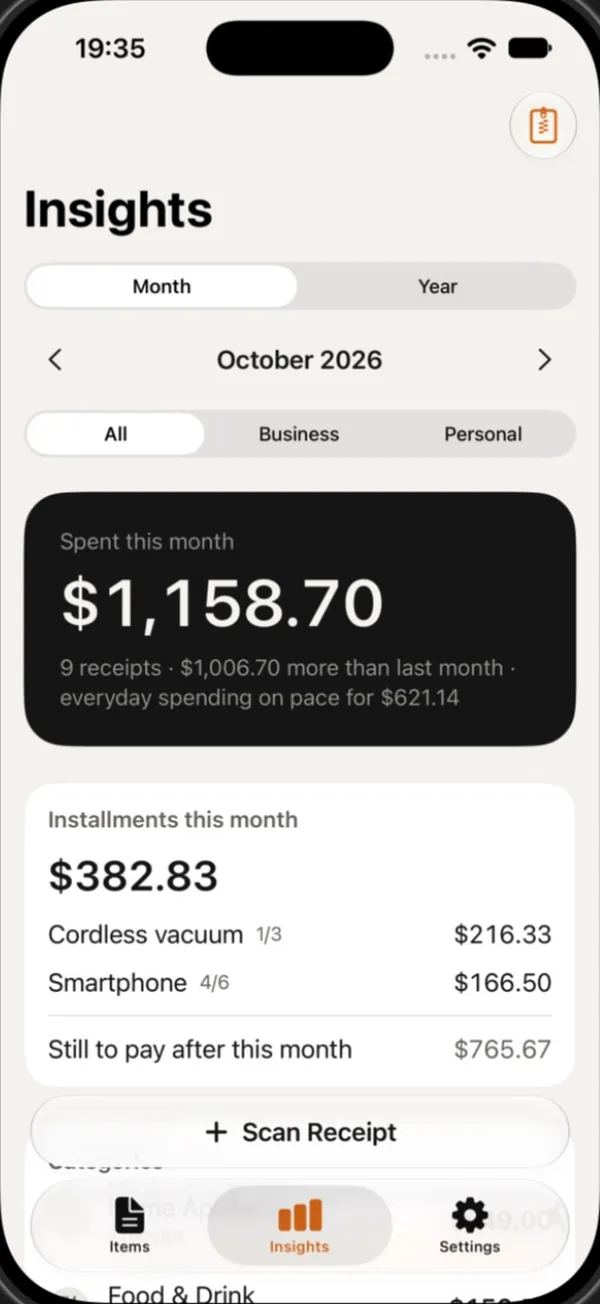
Example: in October you spend $1,158.70 across nine receipts. Two purchases are on installments: the first of three $216.33 payments for a cordless vacuum, and the fourth of six $166.50 payments for a smartphone. That is $382.83 this month, with $765.67 still to pay after it. November looks different once you know that.
Fixed costs and flexible costs
Some costs are the same every month: rent, insurance, subscriptions. Others move: groceries, eating out, transport, small treats. Tracking matters most for the second group, because that is where the money you can actually redirect hides. The CFPB's idea of a weekly limit works well here: a set amount for small purchases each week is easier to keep than a monthly one.
What to do with what you find
After a month, pick the one category that surprised you most and decide one small change: a weekly limit, a cheaper default, or a subscription to cancel. Then check next month whether it worked. One change you keep beats five you forget.
Make it stick
The hardest part of tracking is the second week. Keep the habit small: capture receipts as you get them, and keep the weekly look at five minutes. A rough picture you keep up for months is worth more than a perfect one you drop after ten days.
How Keeptly helps
- Scan a receipt and Keeptly reads the store, date and total on your iPhone. On iOS 26, it can also suggest a name and a category on the device.
- Insights shows your month or your year, with all, business or personal spending, a comparison with last month and a daily pace for the rest of the month.
- It lists the installments that fall in this month and what is still to pay after it.
- Scanning and receipts are free and unlimited. Monthly and yearly totals are part of Premium.
Questions
How long should I track my spending?
The CFPB suggests a week or a month. A full month also catches bills that come once a month.
Is a bank statement enough?
It shows the store and the amount. Receipts add what you bought, which makes categories more accurate, and they cover cash too.
How many categories should I use?
As few as still tell you something useful. Five or six is a good start.
Sources
- Consumer tips for managing spending · U.S. Consumer Financial Protection Bureau